How It Works
Paste a link. Get an answer. Here's what happens and how to read it.
How to scan a link
- 1
Paste any link
Drop a URL into the input box. Full link, shortened link, or just a domain like example.com. url.vet handles the formatting.
- 2
Click Scan
The scan runs live. It takes a few seconds because url.vet fetches the page in real time rather than looking it up in a cached index.
- 3
Read the result
You'll get a trust score from 0 to 100, a verdict, and a breakdown of every check that ran.
What you get back
The trust score
A number from 0 to 100. Higher is safer. 50 is the neutral baseline. A brand new URL with no signals in either direction starts there. Most legitimate sites score above 65. Anything below 30 is worth treating as dangerous.
Risky
score below 30
Suspicious
score 30 to 64
Safe
score 65 and above
The signal breakdown
Below the score you'll see every check that ran, grouped into sections: URL structure, DNS, TLS, domain intelligence, content, and threat feeds. Each one shows a green flag or a red flag. Red flags push the risk score up. Green flags build trust.
The page preview
url.vet takes a live screenshot of the page. It's one of the fastest ways to spot a phishing site. If the page looks like your bank's login screen but the domain has nothing to do with your bank, that's something no automated check can fully catch.
Sharing a result
Every scan has a permanent shareable URL. Use it to send a result to a colleague, post it in a security thread, or report a suspicious link to someone who needs context. The link includes the verdict and score so whoever you send it to sees the result without having to re-scan.
The checks
18 checks run at the same time the moment you submit. Each one is independent, so a timeout or failure in one never holds up the rest.
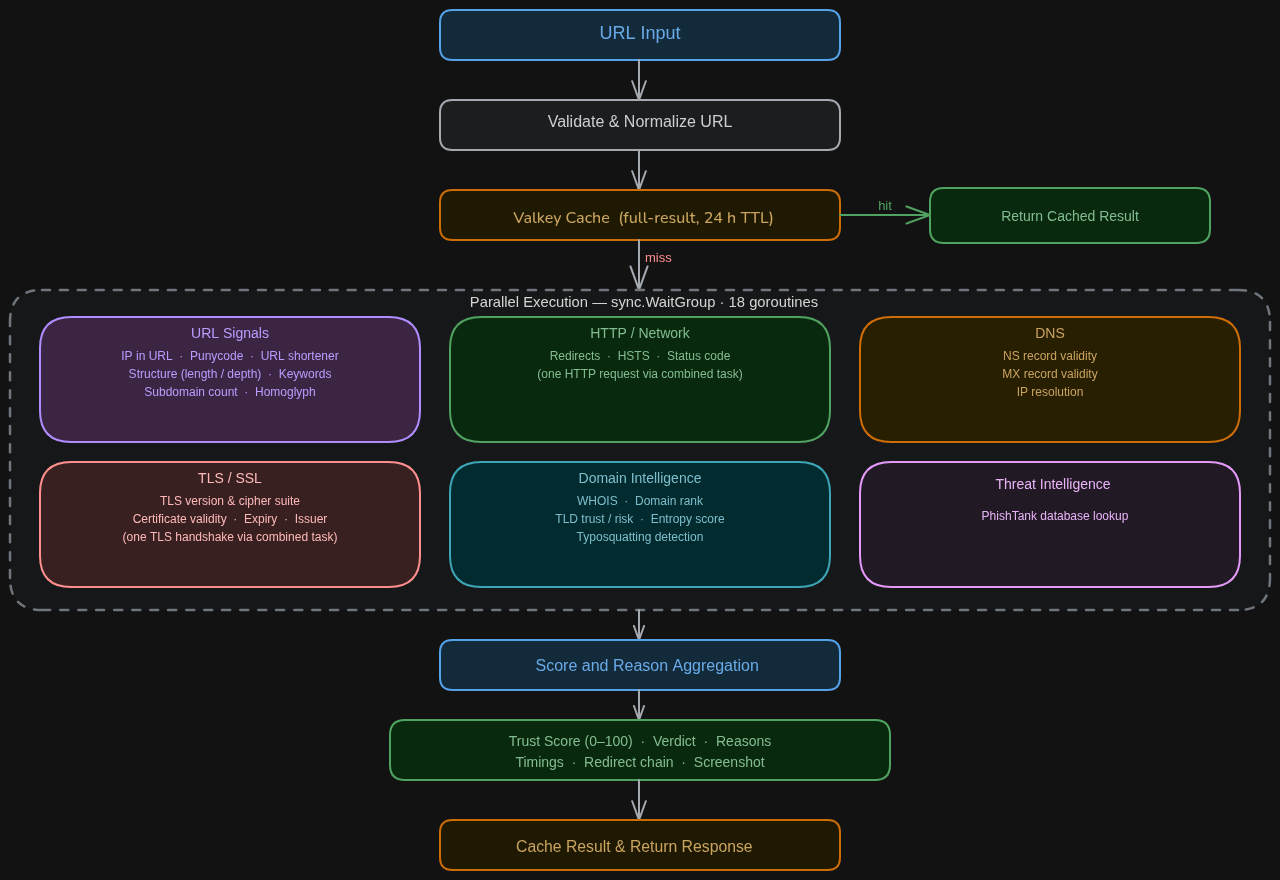
Checks run in parallel, not in sequence. The slowest check sets the total scan time, not the sum of all checks. Scores are calculated once all signals are collected. The score reflects the weight of everything combined.
URL structure
Inspects the link before making any network request. Checks for IP addresses used as hostnames, URL shorteners, suspicious keywords in the path, IDN homograph attacks, and unusually deep subdomains.
HTTP / Network
Makes one real request and follows every redirect. Checks HSTS, status code, and whether the final destination differs from the link you pasted.
DNS
Verifies NS and MX records exist and that the domain resolves to a real IP.
TLS / SSL
Checks certificate validity, expiry, issuer, Certificate Transparency log inclusion, and known-bad fingerprints.
Domain intelligence
Looks up domain age via WHOIS, global traffic rank, TLD classification, DNSSEC status, character randomness in the domain name, and typosquatting similarity against 500+ brands.
Content analysis
Fetches and parses the page. Detects login and payment forms on suspicious domains, hidden iframes, brand impersonation, and forms that submit data to external servers.
Threat intelligence
Checks the URL against PhishTank's databases of confirmed and reported phishing links.
Limitations
Heuristic detection means false positives are possible. A legitimate site that's new and unranked might score lower than it deserves.
There's no ML model as of now, and that's intentional. A model that can't explain its reasoning isn't useful when trust is on the line.
Use url.vet as one layer of defense, not the only one.
Got a link you're not sure about?
Check it on url.vet